Skip to content
English - Australia
  • There are no suggestions because the search field is empty.

Inviting your accountant or bookkeeper to MYOB

Source: MYOB

If you're the business owner (typically the person who set up your MYOB subscription) and you have the Administrator role, you can invite one or more accounting advisors to access your business information at any time. So long as they're an MYOB Partner, an accounting advisor could be your accountant, bookkeeper, or any other person that you may want to help you with your business. If they're not an MYOB Partner, you'll need to invite them as a user.

Inviting an accounting advisor to become a registered user will allow them access to all of your business information directly via the internet, and enable them to work with you on your books. There’s no need to send any files, and you can continue entering invoices, payments, and so on as normal. Advisors are also able to set up bank feeds for your file.

To invite an accounting advisor

  1. In your MYOB business, click the settings menu (⚙️) and choose Users and permissions.

  2. Click Create advisor.

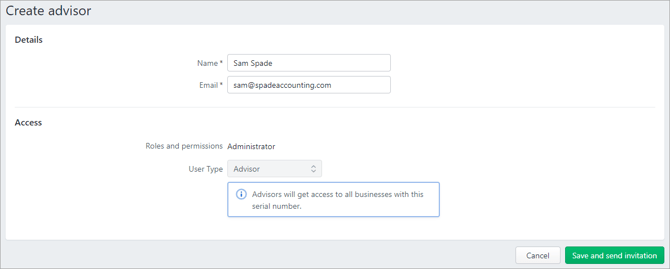
  3. Enter the advisor's Name and Email.
    The advisor will have the role of Administrator and the User Type of Advisor which gives them access to all businesses with this serial number.

    Example advisor being added to MYOB


  4. Click Save and send invitation. The invitation is sent to your advisor. A message appears next to the advisor's email address that the invitation is pending.

When the advisor accepts their invitation, they'll be prompted to log in with their MYOB account details or create an account.