1. Go to Money > Bank Transactions.
2. Open the incoming CREDIT transaction.
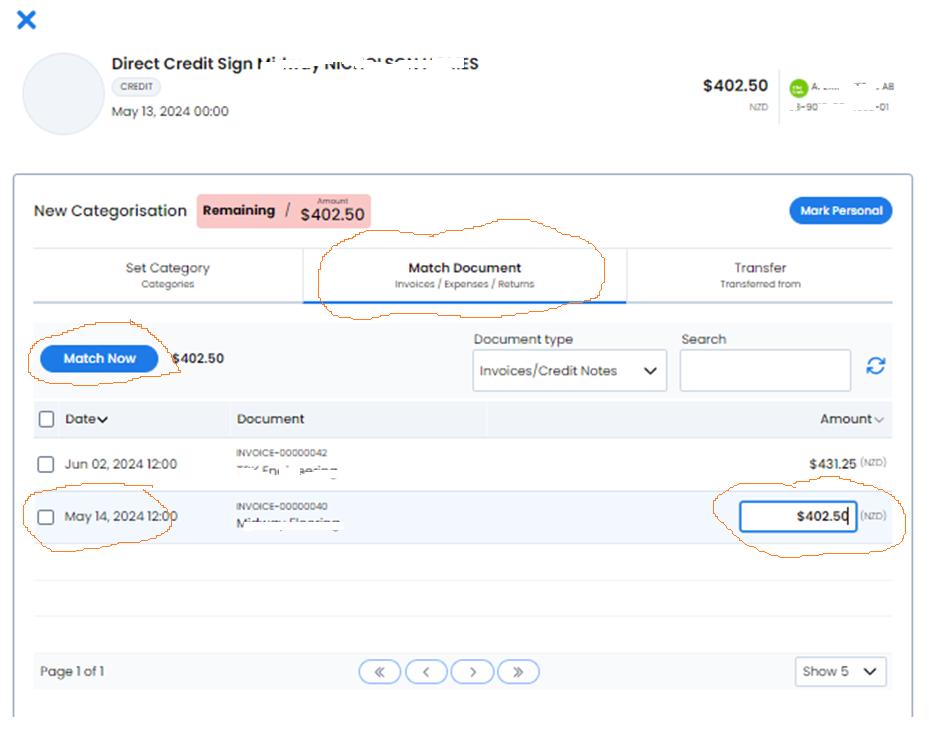
3. Select Match document.
4. Set Document type to Invoices.
5. Use Search or Contact to find the invoice.
6. Select the matching invoice or invoices.
7. Check the allocation amount for each selected invoice.
8. Select Match Now only after the total allocation agrees with the bank transaction.
The allocation amount can be edited before matching. This supports a partial allocation when the customer has paid only part of an invoice. The same matching view can select more than one invoice when one payment covers several invoices.
Check the customer, date, amount and selected documents carefully before confirming the match.