Skip to content
English - Australia
  • There are no suggestions because the search field is empty.

How do I add an ACC number to my business profile?

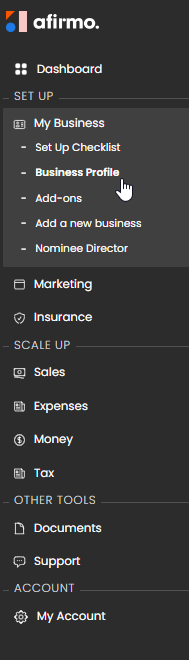
In the Main menu, click on My Business and then select Business Profile


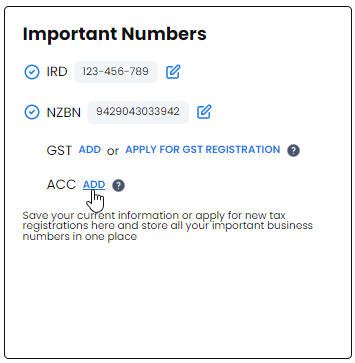
Scroll down to the Important Numbers to ACC and click on Add


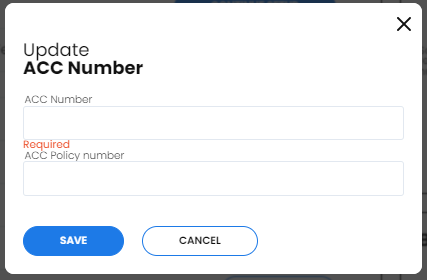
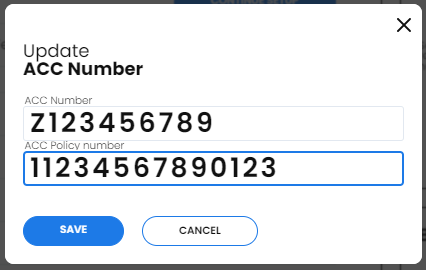
Enter your ACC number and your ACC Policy number

NB You will find both numbers on the ACC invoice e.g.


Click the Save now button once you are finished.

NB - ACC does not need to be setup when you start a new business. NB - When you submit your first tax return, the IRD sends the information through to ACC who setup an account and send you an invoice based on your earnings. NB - You will receive an invoice every year you are in business (submit a tax return). NB - Businesses receive two invoices, one for shareholders and one for employers. These are calculated based on profit from shares and margin of the return amount you filed.

NB - ACC uses your BIC code to calculate the levies you will need to pay (only if you have earnings liable for ACC levies). Supplying an incorrect BIC code will mean your ACC invoices are calculated incorrectly.